

AutoRAG Deep Search
LLM-orchestrated multi-step research for complex queries requiring thorough analysis
Overview
Deep Search uses an LLM planner to break complex queries into multiple steps and execute them sequentially, building on results from earlier steps. It is designed for highly detailed, accurate responses where short latency is not the primary concern.
There are two Deep Search modes depending on the query type:
- Standard Deep Search (
query_type: 2+use_llm_planner: true): Uses the built-in Local Search retriever. - Custom Deep Search (
query_type: 4+use_llm_planner: true): Uses Custom Retriever tools, with automatic tool selection.
You can also send "mode": "DEEP_SEARCH" instead of
setting query_type and use_llm_planner. The service then uses Custom
Retriever tools when they are available, and Local Search otherwise.
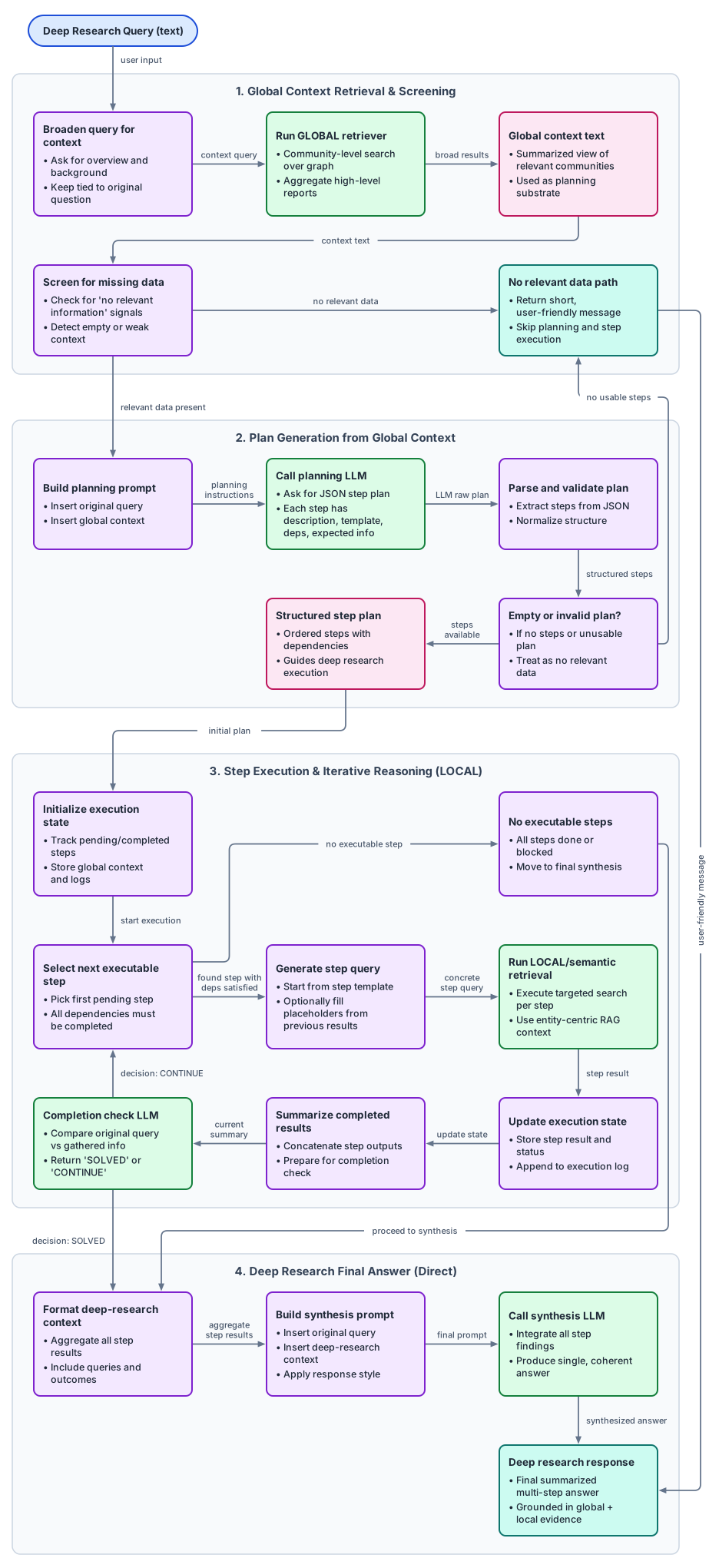
Standard Deep Search
Standard Deep Search uses Local Search as the underlying retriever.
Configuration
{
  "query_type": 2,
  "use_llm_planner": true
}
use_llm_planner is not specified for LOCAL queries, it defaults to
true (Deep Search mode).Custom Deep Search
Custom Deep Search uses Custom Retriever tools. Instead of specifying which tools to run, the LLM automatically plans and executes the search across multiple steps.
Configuration
{
  "query_type": 4,
  "use_llm_planner": true
}
You can optionally provide custom_tools to limit which tools are available.
If omitted, all tools are auto-loaded from the Tools collection.
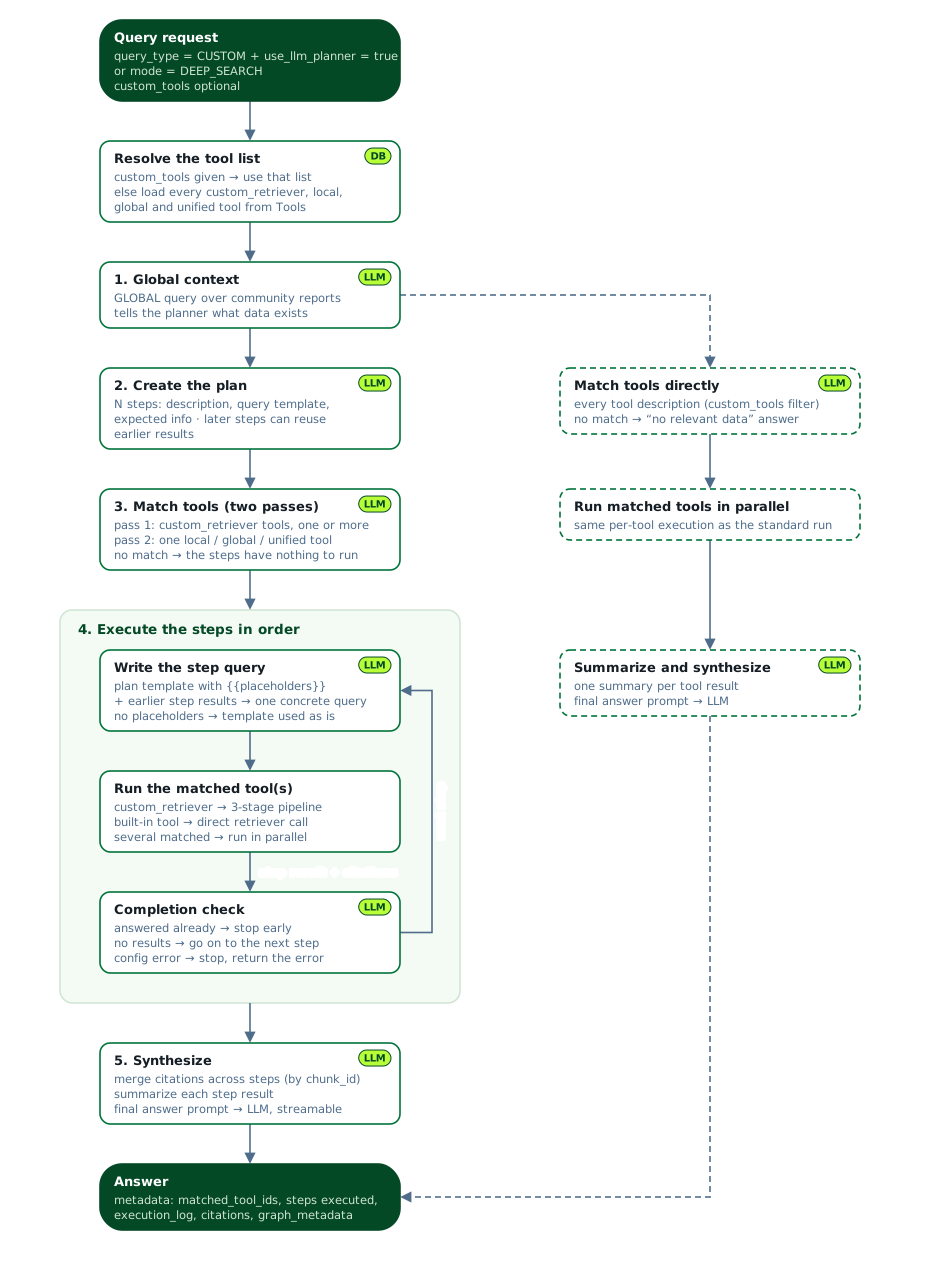
How Deep Search works
Both modes plan and execute the search in steps. Tool matching (step 3) only applies to Custom Deep Search:
Get global context: Runs a Global Search over the community reports so the planner knows what data is available.
Create execution plan: The LLM reads the global context and the query, then breaks the query into steps. Each step has a description, a query template, and the information it is expected to find. Later steps can reuse the results of earlier steps.
Match tools: The LLM selects tools based on their descriptions, in two passes:
- Pass 1: LLM picks one or more
custom_retrievertools. - Pass 2: If no
custom_retrievertool matches, LLM picks one service-retriever tool (local,global, orunified). - If
custom_toolsis not provided, the system auto-loads allcustom_retriever,local,global, andunifiedtools from theToolscollection.
The matched tools are used for all steps in the plan. If no tool matches, the steps have nothing to run.
- Pass 1: LLM picks one or more
Execute each step: Steps run in order. For each step, the LLM fills the
{{placeholders}}in the query template with results from earlier steps to write one concrete query. The matched tools then run, in parallel if there are several. A completion check follows each step:- If the query is already answered, execution stops early.
- If the step found no results, execution continues with the next step.
- If a tool reports a configuration error, execution stops and the error is returned.
Synthesize final answer: Citations from all steps are merged by
chunk_id, each step result is summarized, and the LLM produces the final answer, which can be streamed.
If the global context is empty, for example because there are no communities, Custom Deep Search skips planning. The LLM matches tools directly against all tool descriptions, the matched tools run in parallel, and their results are summarized and synthesized into the answer. If no tool matches, the service answers that no relevant data was found.
Writing good tool descriptions
For Deep Search tool selection, the LLM reads each tool’s description and
picks the tools that match. Description quality directly affects which tools
are chosen.
Use this pattern:
- What this tool searches
- Best question type
- When to use this tool
Example descriptions:
localtool: “Use this for customer/account-level investigations in our support and CRM data (ticket timelines, owner changes, SLA breaches). Best for ‘why did this specific case fail’ questions.”globaltool: “Use this for org-level trend summaries across quarterly reports, KPI dashboards, and region performance docs. Best for leadership questions about overall patterns.”unifiedtool: “Use this for end-to-end analysis that combines business summary and concrete evidence from policy docs, tickets, and metrics tables in one response.”
Best use cases
- Complex multi-part questions that require multiple search steps.
- Queries where the right tool is not known upfront.
- When you want the LLM to plan the search strategy automatically.
- Aggregation of highly technical details across the knowledge graph.
Next Steps
- Custom Retriever: Create custom tools for Deep Search to use.
- Custom Prompts: Customize the planning and synthesis prompts.
- Execute queries: Learn how to call the search endpoints.