

Custom Retriever
Domain-specific search using configurable tools with flexible search strategies and custom graph traversal
Overview
Custom Retriever enables domain-specific search and retrieval using
configurable, natural-language-described tools stored in the ArangoDB Tools
collection. Unlike the built-in search methods (Global, Local, Unified),
Custom Retriever allows you to define your own search logic, combine multiple
search strategies, and execute custom graph traversal queries tailored to your
specific use case.
Custom retrievers can target any collection in the same database, whether it was created by the Importer (Knowledge Graph data) or contains pre-existing domain-specific graph data from structured sources.
Since tools are described in natural language, they can also be used by Deep Search, where the LLM selects the best tool automatically based on the query.
Configuration
{
  "query_type": 4,
  "custom_tools": ["my_tool_id"]
}
How it works
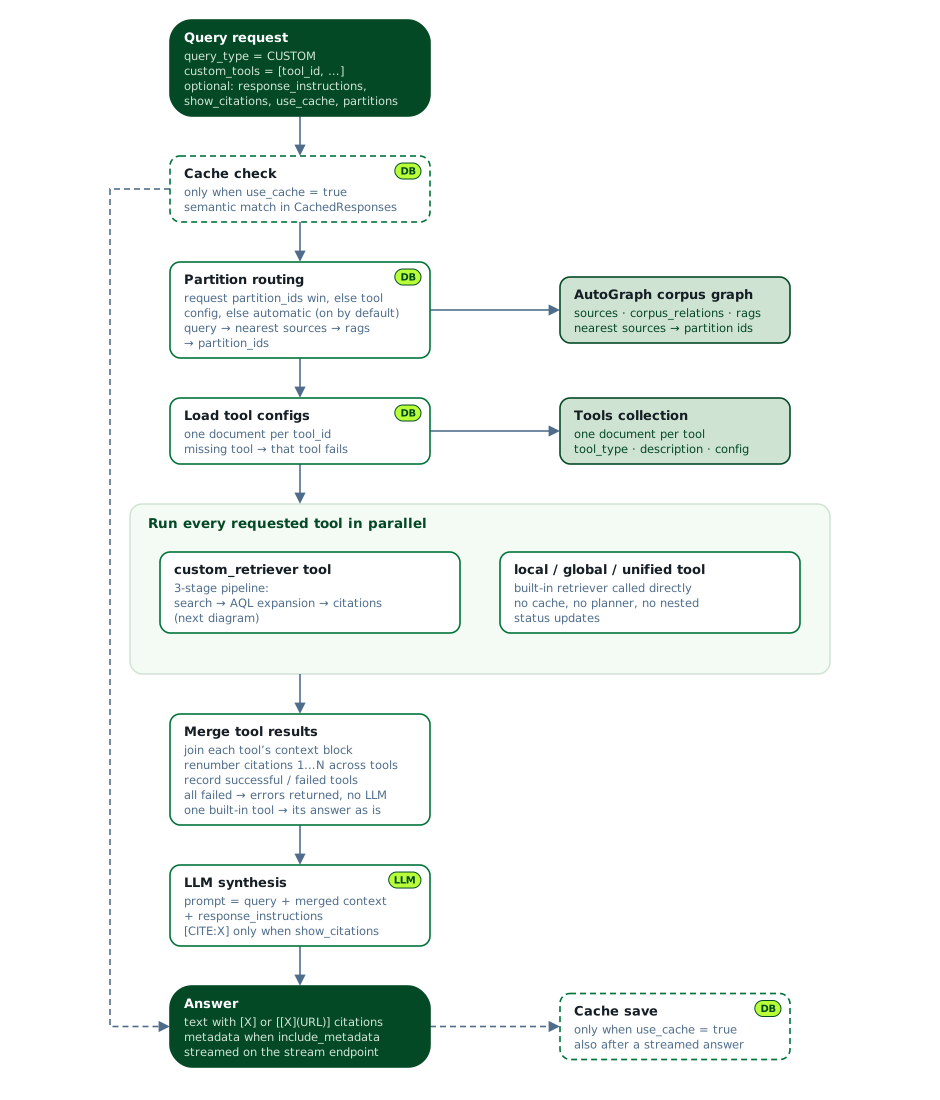
Every tool listed in custom_tools runs at the same time. A custom_retriever
tool goes through the 3-stage pipeline described below; a local, global, or
unified tool calls the built-in retriever directly. Citations from different
tools are renumbered so they never collide, and the LLM synthesizes the merged
results into one answer.
Each custom_retriever tool uses a 3-stage pipeline:
Stage 1 - Search for starting nodes: Find relevant documents using one or more search modes:
- Lexical Search: Full-text BM25 search using inverted indexes and search-alias views.
- Semantic Search: Vector similarity search using embeddings and cosine distance.
- Hybrid Search: Combines lexical and semantic search with weighted RRF (Reciprocal Rank Fusion).
Stage 2 - AQL graph expansion: Expand and enrich results using custom AQL queries. Execute custom graph traversal queries to gather related entities and relationships.
Stage 3 - Citation processing: Format results with optional citations. Deduplicate chunks, create citation mappings, and format context data with
[CITE:X]markers.
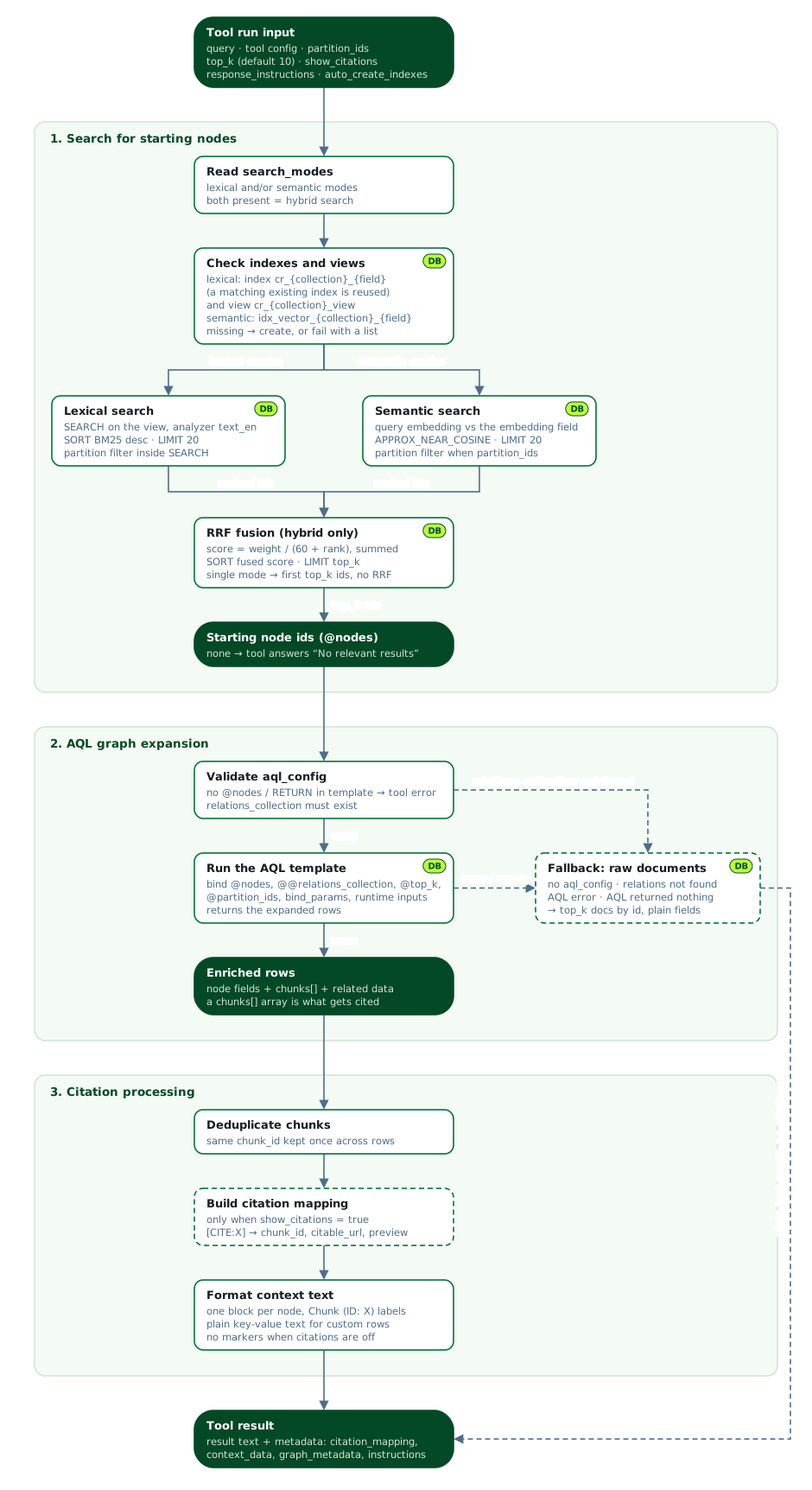
If the relations collection is missing, the AQL query fails, or it returns no
results, the tool falls back to the plain starting documents. A template without
@nodes or RETURN makes the tool fail instead.
Tool configuration
Custom tools are stored in the ArangoDB Tools collection
with the following structure:
{
  "_key": "my_custom_tool_v1",
  "tool_id": "my_custom_tool_v1",
  "tool_type": "custom_retriever",
  "description": "Natural language description of when to use this tool",
  "config": {
    "collection": "MyCollection",
    "search_modes": [
      {
        "type": "lexical",
        "field": "content",
        "weight": 0.4
      },
      {
        "type": "semantic",
        "field": "embedding",
        "weight": 0.6
      }
    ],
    "top_k": 5,
    "show_citations": true,
    "response_instructions": "Provide structured data with clear formatting.",
    "aql_config": {
      "template": "LET nodes = @nodes\nFOR nodeId IN nodes\n  LET doc = DOCUMENT(nodeId)\n  FILTER @include_all OR doc.status == 'active'\n  LIMIT @max_results\n  RETURN doc",
      "relations_collection": "MyRelations",
      "bind_params": {
        "max_results": 10,
        "include_all": false
      }
    }
  }
}
Configuration parameters
collection: Target collection for search.search_modes: Array of search strategies:type:"lexical"or"semantic"(include both for hybrid search).field: Field to search on. For semantic search, this must point to a field containing pre-computed vector embeddings.weight: RRF weight (higher = more important in fusion). Only applies when both lexical and semantic modes are present.
top_k: Number of results to retrieve from search.show_citations: Whether to generate citations (tool-level control).response_instructions: Custom instructions for LLM response formatting (e.g., “Use table format”, “Provide bullet points”).aql_config:template: AQL query template (must use@nodesbind variable).relations_collection: Collection for relationship queries.bind_params: Custom parameters passed to AQL execution. Default values defined here act as safe defaults for the AQL template and can be overridden at query time.
auto_create_indexes: Whether to create missing indexes and views for this tool. Takes priority over the request-levelauto_create_indexes. See Index and view management.partition_ids: Specific partition IDs for this tool, as a non-empty list of strings. Setting them is enough to turn automatic selection off for the tool.auto_select_partitions: Whether the service picks the partitions for this tool automatically. A boolean,trueby default. Setting it totruein a tool that also haspartition_idsis rejected.max_partition_limit: Maximum number of partitions that automatic selection can return for this tool. Must be a positive integer. Defaults to the service value of3when omitted.
auto_select_partitions to
true while another sets it to false, or in which one tool has
partition_ids while another explicitly sets auto_select_partitions to
true. Tools that leave the field unset are not part of this check.auto_select_partitions for how
routing works when the tool config leaves them unset.Index and view management
By default, the system creates the required indexes and views before executing a
search if they do not exist yet. Pass "auto_create_indexes": false in your
request to check instead of create: the query then returns a clear error listing
what is absent. This affects the tools that do not set auto_create_indexes
themselves. A tool with auto_create_indexes set to true in its own
configuration still creates what it needs, whatever the request asks for.
curl -X POST https://<EXTERNAL_ENDPOINT>:8529/graphrag/retriever/<SERVICE_ID_POSTFIX>/v1/graphrag-query \
  -H "Content-Type: application/json" \
  -H "Authorization: Bearer <your-jwt-token>" \
  -d '{
    "query": "Find airports in New York",
    "query_type": 4,
    "custom_tools": ["airport_search_v1"],
    "auto_create_indexes": false
  }'
When neither the request nor the tool sets auto_create_indexes, missing
indexes and views are created automatically.
Resources created automatically:
| Search type | Resource | Naming pattern |
|---|---|---|
| Lexical | Inverted index | cr_{collection}_{field} |
| Lexical | Search-alias view | cr_{collection}_view |
| Semantic | Vector index | idx_vector_{collection}_{field} |
The cr_ prefix marks resources as Custom Retriever-managed, making them easy
to identify and clean up separately from Importer-created or manually created
resources.
Examples
Entity relationship expander
This tool searches Knowledge Graph entities using hybrid search and expands results with graph relationships:
{
  "_key": "entity_relationship_expander_v1",
  "tool_id": "entity_relationship_expander_v1",
  "tool_type": "custom_retriever",
  "description": "Searches technical documentation for component definitions, architecture explanations, and system integrations.",
  "config": {
    "collection": "SecureSystems_test_Entities",
    "search_modes": [
      { "type": "lexical", "field": "entity_name", "weight": 0.3 },
      { "type": "semantic", "field": "embedding", "weight": 0.7 }
    ],
    "top_k": 30,
    "show_citations": true,
    "aql_config": {
      "template": "LET nodes = @nodes\nFOR n IN nodes\n  LET entity = DOCUMENT(n)\n  LET entity_chunks = (\n    FOR e IN @@relations_collection\n      FILTER e.type == 'MENTIONED_IN' AND e._from == entity._id\n      LIMIT @max_chunks\n      LET chunk = DOCUMENT(e._to)\n      RETURN { content: chunk.content, chunk_id: chunk._key }\n  )\n  LET related_entities = (\n    FOR e IN @@relations_collection\n      FILTER e.type == 'RELATED_TO' AND e._from == entity._id\n      LIMIT @top_k\n      LET related = DOCUMENT(e._to)\n      RETURN { entity_name: related.entity_name, description: related.description, relationship_strength: e.weight }\n  )\n  RETURN { node_id: entity._key, entity_name: entity.entity_name, description: entity.description, chunks: entity_chunks, related_entities: related_entities }",
      "relations_collection": "SecureSystems_test_Relations",
      "bind_params": {
        "max_chunks": 5
      }
    }
  }
}
Structured data search
This tool searches structured data outside the Knowledge Graph using lexical search:
{
  "_key": "airport_search_v1",
  "tool_id": "airport_search_v1",
  "tool_type": "custom_retriever",
  "description": "Searches airport database for airport information by name, city, or state.",
  "config": {
    "collection": "airports",
    "search_modes": [
      { "type": "lexical", "field": "name", "weight": 1.0 }
    ],
    "top_k": 10,
    "show_citations": false,
    "aql_config": {
      "template": "LET nodes = @nodes\nFOR n IN nodes\n  LET airport = DOCUMENT(n)\n  LET outgoing_flights = (\n    FOR flight IN flights\n      FILTER flight._from == airport._id\n      LIMIT @max_flights\n      LET dest = DOCUMENT(flight._to)\n      RETURN { destination: dest.name, carrier: flight.UniqueCarrier, distance: flight.Distance }\n  )\n  RETURN { airport_code: airport._key, airport_name: airport.name, city: airport.city, state: airport.state, outgoing_flights: outgoing_flights }",
      "relations_collection": "flights",
      "bind_params": {
        "max_flights": 5
      }
    }
  }
}
Best use cases
- Domain-specific search: Airport data, digital twins, network data, product catalogs, customer records.
- Custom business logic: Multi-step retrieval with domain rules.
- Hybrid search requirements: Control lexical vs. semantic balance per domain.
- Graph traversal needs: Expand search results with custom relationship patterns.
- Multi-tool workflows: Execute multiple specialized tools in parallel.
Next Steps
- Deep Search: Use custom tools with the LLM planner for automated multi-step research.
- Execute queries: Learn how to call the search endpoints.
- Parameters: Customize search behavior.