ArangoDB 3.11 reached End of Life (EOL) and is no longer supported.
This documentation is outdated. Please see the most recent stable version.
HTTP API Documentation
All functionality of ArangoDB servers is provided via an HTTP API, and you can call the API endpoints directly, via database drivers, or other tools
ArangoDB servers expose an application programming interface (API) for managing the database system. It is based on the HTTP protocol that powers the world wide web. All interactions with a server are ultimately carried out via this HTTP API.
You can use the API by sending HTTP requests to the server directly, but the more common way of communicating with the server is via a database driver. A driver abstracts the complexity of the API away by providing a simple interface for your programming language or environment and handling things like authentication, connection pooling, asynchronous requests, and multi-part replies in the background. You can also use ArangoDB’s web interface, the arangosh shell, or other tools.
The API documentation is relevant for you in the following cases:
- You want to build or extend a driver.
- You want to utilize a feature that isn’t exposed by your driver or tool.
- You need to send many requests and avoid any overhead that a driver or tool might add.
- You operate a server instance and need to perform administrative actions via the API.
- You are interested in how the low-level communication works.
REST-inspired API
The API is inspired by the design principles of REST (Representational State Transfer) and follows many of its conventions, but it does not implement all of them. It is best described as a resource-oriented HTTP API rather than a strictly RESTful one.
The following REST characteristics apply:
- Resources are identified by URIs: A resource can be a database record, a
server log, or any other data entity or object, and you address it by a URI
such as
/_api/document/{collection}/{key}. - Operations are expressed with standard HTTP methods: Mainly
GETfor reading,POSTfor creating,PATCHfor updating,PUTfor replacing,DELETEfor removing, andHEADfor reading metadata only. - Resources are transferred as representations: Documents and other resources are exchanged as JSON (or VelocyPack), independent of how the server stores them internally.
- Standard HTTP status codes indicate the outcome: For example,
200and201on success,404for a missing resource, and409for a conflict.
The following REST constraints are not met:
- No hypermedia (HATEOAS): Responses do not link to related resources or to the operations available next, so you cannot discover the API by following links. You need this documentation or the OpenAPI specification to know which endpoints exist and how to call them.
- Not every endpoint is resource-oriented: Many endpoints are remote
procedure calls rather than operations on a resource, such as
POST /_api/cursorfor running an AQL query,POST /_api/transaction/beginfor starting a Stream Transaction, and most of the/_admin/*endpoints. - Not every interaction is stateless: Most requests are self-contained, but
cursors and
Stream Transactions keep state on the
server that follow-up requests refer to by identifier, like
POST /_api/cursor/{cursor-id}and/_api/transaction/{transaction-id}. - Responses are not cacheable: The server marks every response as
non-cacheable with
Cache-Control: no-cache, no-store, must-revalidate,Pragma: no-cache, andExpires: 0, so HTTP caching plays no role.
URL components
A request URL can look like this:
http://localhost:8529/_db/DATABASE/_api/document/COLLECTION/KEY?returnOld=true&keepNull=false
http://localhost:8529is the origin:httpis the scheme, which ishttpsif you use TLS encryptionlocalhostis the host, which can be an IP address or a domain name including subdomains8529is the port
/_db/DATABASE/_api/document/COLLECTION/KEY?returnOld=true&keepNull=falseis the request target:/_db/DATABASE/_api/document/COLLECTION/KEYis the path, made up of the segments_db,DATABASE,_api, and so onreturnOld=true&keepNull=falseis the query string, a series of key/value pairs separated by ampersands (returnOldis set totrueand so on)
Browsers and programming languages often expose these parts under slightly
different names that include the delimiters, like protocol for http:,
pathname for the path, and search for ?returnOld=true&keepNull=false.
How to read endpoint descriptions
The HTTP API documentation mainly describes the available endpoints, like for updating a document, creating a graph, enabling the maintenance mode, and so on. Each endpoint description starts with the HTTP method and the URL structure:
When endpoints are referenced in the documentation, they are often abbreviated
as follows:PATCH /_api/document/{collection}/{key}
The
PATCHmethod is generally for updating,PUTfor replacing,POSTfor creating (or triggering an action),DELETEfor removing,GETfor reading,HEADfor reading metadata only. There are exceptions where endpoints don’t strictly adhere to this.http://<EXTERNAL_ENDPOINT>:8529is the origin that you need to adjust according to your server configuration and depending on whether you access the server locally or via a network./_api/document/…is the path of ArangoDB’s HTTP API for handling documents. It can be preceded by/_db/:database, with:databasereplaced by a database name, to select another database than the default_systemdatabase.:collectionand:key(and:database) are placeholders called Path Parameters that you have to replace with a collection name and document key (and database name) in this case. They are always required.The convention with the leading colon is recognized by tools that let you send HTTP requests using a visual interface. They show a form for the parameters. A path segment wrapped in
{and}has the same meaning in the documentation, but is typically not recognized by these tools.The pathname can be followed by a question mark and the so-called Query Parameters, which is a series of key/value pairs separated by ampersands to set options, like
/_api/document/COLLECTION/KEY?returnOld=true&keepNull=false. If a query parameter is required, it is labelled as such. Otherwise it is optional.Some endpoints allow you to specify HTTP headers in the request (not in the URL), like
If-Match: "REVISION".A Request Body is the payload you may need to send, typically JSON data. This is often a JSON object with multiple attributes. Required attributes are labelled as such.
Responses are the possible HTTP responses in reply to your request in terms of the HTTP status code (e.g.
202) and typically a JSON payload with a result or error information. This is often a JSON object with multiple attributes. Attributes that are conditionally included in the server response are labelled as optional. Otherwise they are always present.
On the wire, a simplified HTTP request can look like this:
PATCH /_api/document/coll1/docA?returnOld=true HTTP/1.1
Host: localhost:8529
Authorization: Basic cm9vdDo=
If-Match: "_hV2oH9y---"
Content-Type: application/json; charset=utf-8
Content-Length: 20

{"attr":"new value"}
And a simplified HTTP response can look like this:
HTTP/1.1 202 Accepted
Etag: "_hV2r5XW---"
Location: /_db/_system/_api/document/coll1/docA
Server: ArangoDB
Connection: Keep-Alive
Content-Type: application/json; charset=utf-8
Content-Length: 160

{"_id":"coll1/docA","_key":"docA","_rev":"_hV2r5XW---","_oldRev":"_hV2oH9y---","old":{"_key":"docA","_id":"coll1/docA","_rev":"_hV2oH9y---","attr":"value"}}
Swagger specification
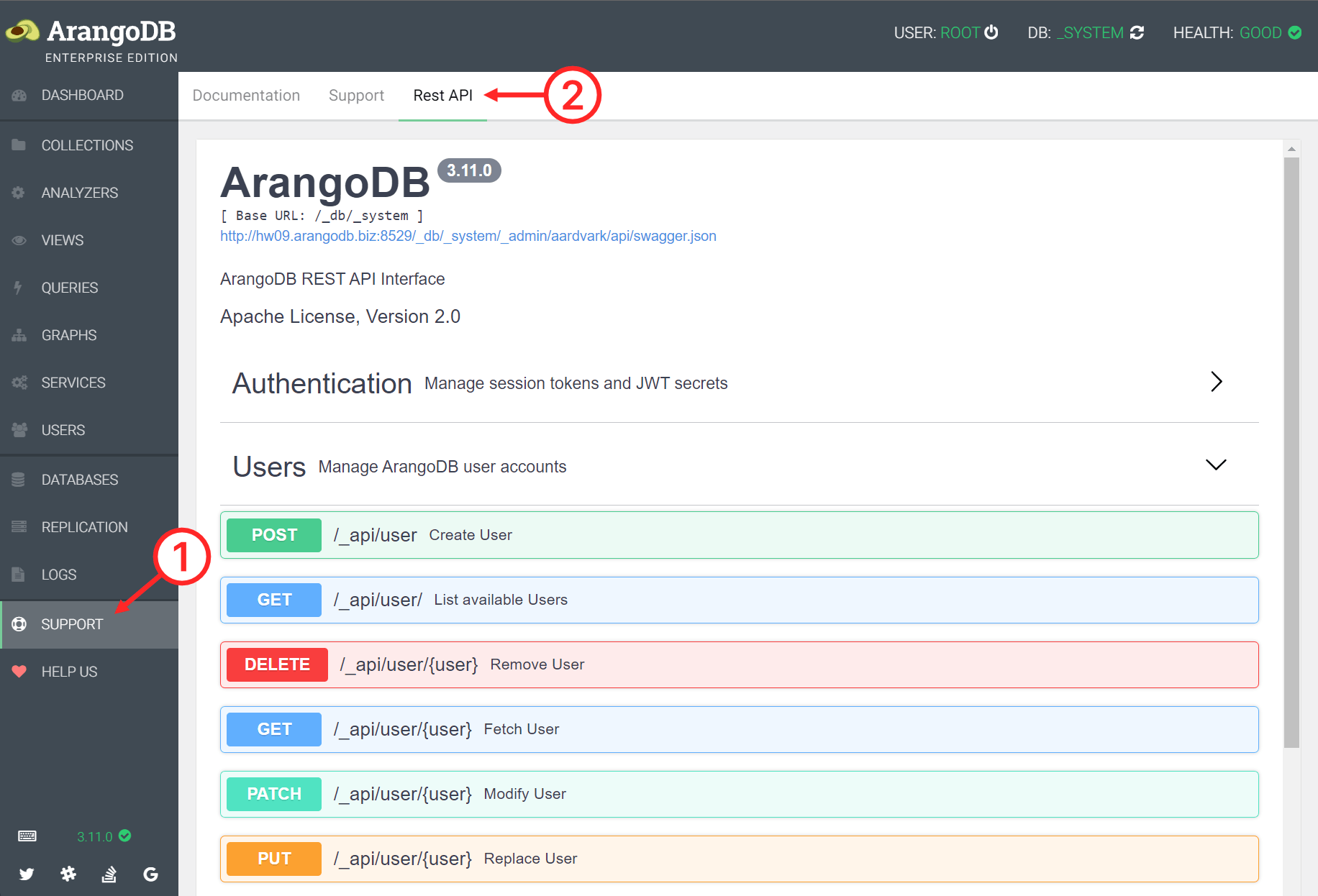
ArangoDB’s HTTP API is documented using the industry-standard OpenAPI Specification, more specifically OpenAPI version 3.1 . You can explore the API with the interactive Swagger UI using the ArangoDB web interface.
- Click SUPPORT in the main navigation of the web interface.
- Click the Rest API tab.
- Click a section and endpoint to view the description and parameters.